Guide ·
ChatGPT Study Hours vs Quiet Hours: A Homework Plan
Choose between ChatGPT Study hours and Quiet hours, check the linked teen account, and keep a separate list of the apps homework needs.
On this page7 sections
Your teen needs a browser for the assignment and wants ChatGPT nearby for help. Before choosing a schedule, agree on what kind of help the assignment allows and which apps should stay available.
ChatGPT offers two different schedules. Study hours start eligible new conversations in study mode. Quiet hours set times when a linked teen cannot use ChatGPT. Choosing between them starts with the job you want the schedule to do.
Choose the job before the setting
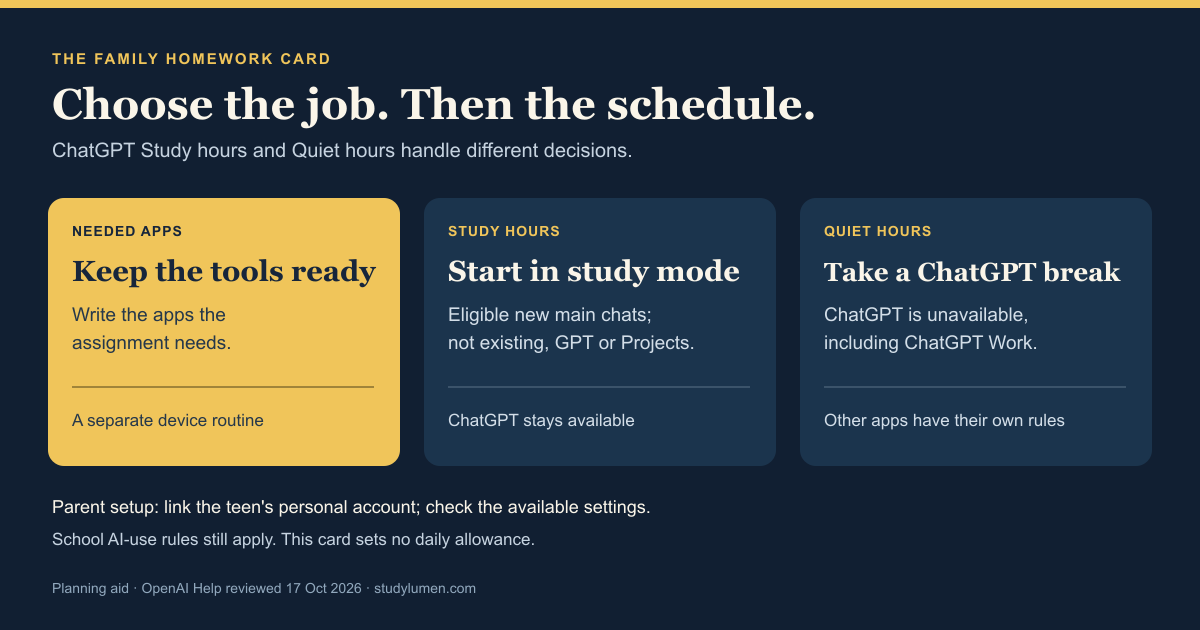
Keep these three decisions on one card. Fill in the app names and times yourselves; this is a planning aid, not a recommended daily allowance.
- Decision
- Apps needed for the assignment
- Write on the card
- App names: ___
- What handles it
- A separate phone or device routine
- Decision
- Start eligible new ChatGPT chats in study mode
- Write on the card
- Study hours: ___ to ___, if wanted
- What handles it
- ChatGPT Study hours
- Decision
- Take a scheduled break from ChatGPT
- Write on the card
- Quiet hours: ___ to ___, if wanted
- What handles it
- ChatGPT Quiet hours
| Decision | Write on the card | What handles it |
|---|---|---|
| Apps needed for the assignment | App names: ___ | A separate phone or device routine |
| Start eligible new ChatGPT chats in study mode | Study hours: ___ to ___, if wanted | ChatGPT Study hours |
| Take a scheduled break from ChatGPT | Quiet hours: ___ to ___, if wanted | ChatGPT Quiet hours |
For example, a family might write “school portal, browser and calculator” on the first line. Whether ChatGPT belongs in that assignment is a separate question for the teacher's AI-use rules. The card gives another adult helping with homework something concrete to check without guessing what “study time” means.
What Study hours actually change
OpenAI's study-mode guide describes Study hours as an optional schedule for eligible new conversations in the main ChatGPT experience. Existing conversations, GPTs and Projects are outside that schedule. It does not block ChatGPT.
Study mode can still make mistakes or give a direct answer. For graded work, follow the school's or teacher's AI-use policy and check important information against the course materials. A study-mode schedule cannot decide what assistance an assignment permits.
OpenAI named Study Hours in its 18 August 2026 announcement. The setup guidance below follows the current help pages.
When Quiet hours fit the plan
If the intention is a break from ChatGPT, OpenAI's parental-controls guide describes Quiet hours as the schedule that prevents the linked teen from using ChatGPT, including ChatGPT Work.
Write that intention on the card before setting its start and end. For a period when the assignment needs no AI assistance, the useful decision is when ChatGPT should be unavailable. The apps needed to read, calculate or submit the work still need their own plan.
Check the linked account before setup
These instructions concern a personal ChatGPT account linked to a teen's account. For the documented parent-invites-teen route on the web, the parent opens Settings → Parental controls → Add family member and sends the invitation. The teen accepts before the parent manages their settings under Family members.
For Quiet hours, the parent selects the teen, turns on Quiet hours and chooses a start and end. Both schedules are managed in Settings → Parental controls, rather than in a conversation. Check the available labels in that account; contact OpenAI Support through the linked help page if the expected control is missing. We reviewed the documentation without testing a linked teen account.
Either person can unlink the accounts. OpenAI also removes parental controls when it identifies the linked account as belonging to someone 18 or older.
In some eligible ChatGPT Edu workspaces, an administrator may require study mode and the Study selector may be absent. Ask the school or workspace administrator about that account.
Keep the rest of the phone in view
Return to the app list when the schedule is ready. “ChatGPT is unavailable” and “these homework apps are available” are different instructions. Quiet hours do not configure the other apps on the phone.
Ask whether the student can still open the assignment, use the required tools and submit the work under the family's chosen device rules. If an app is unexpectedly blocked, identify which tool or administrator controls that restriction before asking for a change. That keeps an app-access problem from turning into repeated changes to the wrong schedule.
Keep the card somewhere the adults helping with homework can use it. Revise the app list when the task changes, and ask the teacher when the permitted use of AI is unclear.
Use the same app list in StudyLumen
On a supervised Android device, a StudyLumen homework routine applies one selected app rule set during its scheduled window. Add the needed study apps to that rule set. This carries the card's app list into the device routine.
If another tool is needed, a temporary access request requires supervisor approval and ends at the grant's recorded end time. Approval changes StudyLumen's own access restriction. ChatGPT schedules, Family Link and school or operating-system restrictions still have their own controls.
Sources
- Managing parental controls in ChatGPT — OpenAI Help. Current linked-account and schedule instructions; the page shows a relative update label.
- Using study mode in ChatGPT — OpenAI Help. Scheduled conversation scope, limitations and the separate ChatGPT Edu case.
- Introducing ChatGPT for Teens — OpenAI, 18 August 2026. Earlier announcement naming Study Hours.