Guide ·
November SAT Registration: Check the Device Plan Now
Check the November 7 SAT registration deadlines, the student's account and device availability, then follow the right Bluebook setup route.
On this page7 sections
Before the November SAT registration deadline, a family needs more than a date on the calendar. The student needs to know which account holds the registration and which suitable device will be available for the test.
Choose that device now. Completing Bluebook exam setup is a separate task, and its timing depends on how the student gets the device.
Record the November 7 deadlines
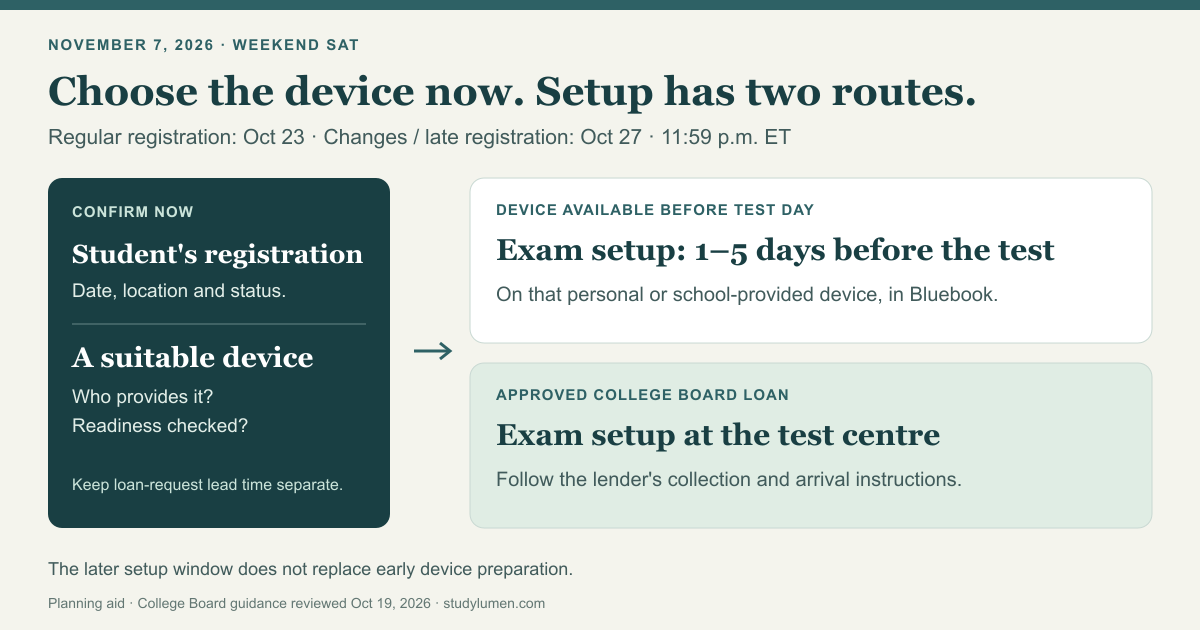
College Board's current dates table lists November 7, 2026 as a weekend SAT test date. Its regular registration deadline is October 23, 2026. The column for changes, regular cancellation and late registration lists October 27, 2026.
The page says weekend deadlines expire at 11:59 p.m. Eastern Time, U.S., and that the listed dates apply to U.S. and international students. Use that clock when planning; do not substitute your local midnight. Late registration may involve additional fees.
For SAT School Day and other in-school assessments, the school or district handles registration. Families should confirm that they are looking at the weekend administration before using these deadlines.
The student completes the registration
College Board's registration instructions say the student must register for themself; a parent or counselor cannot do it for them. A parent can help organize the plan while the student uses their own College Board account.
The procedure includes choosing a test date and location, signing in, and uploading a photo that meets the requirements. Available seats are shown during registration. A preferred test centre on a family note is not the same as a completed registration.
The instructions also say a registration can be started and finished later. Leave enough room for the task and check its actual status in the student's account before treating it as done. An evening timer ending cannot tell you whether a form was submitted.
Choose the testing device now
Check which device the student can actually use, who provides it and whether its preparation has been checked. College Board's device-readiness guide lists Windows laptops or tablets, Mac laptops, iPads and school-managed Chromebooks. It excludes personal Chromebooks and phones from running Bluebook.
That guide calls for early preparation, including downloading Bluebook and checking the device. It also warns that students using school-managed devices may lack permissions to fix issues on test day. Ask the school about its device before relying on it.
The regular registration deadline does not replace earlier device-preparation instructions. If a preparation step is outstanding or unclear, check with the school or College Board rather than assuming the later exam-setup window resolves it.
College Board's device-lending instructions have an earlier lead time: register and complete a device request at least 30 days before test day. A request does not guarantee a device. The page's FAQ lists borrowing from a school, friend or family member, or registering for a later test date, as options when the request deadline has been missed. Questions about an existing request belong with College Board.
Use the setup route for that device
For a personal or school-provided testing device available before the test, College Board's admission-ticket instructions say to open Bluebook on that device, sign in and complete exam setup 1–5 days before test day. That produces the admission ticket. The device-readiness guide gives the same setup window.
For an approved College Board loan, the lending page describes a different route: the student receives the device at the test centre, signs in, completes exam setup and gets the ticket there. Follow that page's collection and arrival instructions for the loan arrangement.
Put the applicable route on the plan. A device borrowed from school in advance and a College Board device collected at the centre are different arrangements, even though both are borrowed devices.
Keep a registration record
This short record can help a student and the adult helping them see what still needs attention. It is a family planning aid, not another College Board form.
- Decision
- Weekend registration
- Record now
- Student's account, selected date and registration status
- Next action
- Student finishes or checks the registration before the applicable deadline
- Decision
- Device available in advance
- Record now
- Which suitable device, who provides it and any unresolved readiness issue
- Next action
- Resolve readiness now; complete Bluebook exam setup 1–5 days before the test
- Decision
- Approved College Board loan
- Record now
- Existing request status and the issuer's instructions
- Next action
- Follow the test-centre collection and setup route
- Decision
- Evening phone routine
- Record now
- Apps needed for the work that follows
- Next action
- Check the form's status separately, then return to the agreed routine
| Decision | Record now | Next action |
|---|---|---|
| Weekend registration | Student's account, selected date and registration status | Student finishes or checks the registration before the applicable deadline |
| Device available in advance | Which suitable device, who provides it and any unresolved readiness issue | Resolve readiness now; complete Bluebook exam setup 1–5 days before the test |
| Approved College Board loan | Existing request status and the issuer's instructions | Follow the test-centre collection and setup route |
| Evening phone routine | Apps needed for the work that follows | Check the form's status separately, then return to the agreed routine |
Do not mark the device line complete just because a laptop is somewhere in the house. The useful answer is which device will be available, whether its requirements have been checked, and who can resolve any remaining issue.
Fit the phone routine around the form
Keep the personal Android phone's evening routine separate from the testing-device plan. A StudyLumen homework routine applies one selected app rule set on a supervised Android device during its scheduled window. Use the app list for the homework that follows the administrative task.
If another study app is needed during that routine, a temporary access request requires supervisor approval and ends at the grant's recorded end time. Approval changes StudyLumen's own access restriction. The College Board registration and Bluebook setup still have their own status and instructions.
Sources
- SAT Suite test dates and deadlines — College Board. November 7 weekend row, deadline clock and separate in-school registration scope.
- Registering — College Board. Student actor and the online-registration procedure.
- SAT device readiness — College Board. Supported devices, early preparation and Bluebook setup timeline.
- SAT device lending — College Board. Request lead time, alternatives and the test-centre setup route for College Board loans.
- What to bring on SAT test day — College Board. Exam setup and admission-ticket instructions for a device available beforehand.